
FleaMarketBay: Marketplace
Flea Market Bay LLCShopping
4.5389.00 Reviews
- Version
- 1.3.1
- Installs
- 100.00K
- Age Rating
- Teen
Screenshots


Our Review of FleaMarketBay: Marketplace
 Analysis by Appyee
When I use a local marketplace on my phone, the most important moments often depend on a steady connection: searching nearby listings, opening photos, and keeping a conversation moving while arranging a handoff. That makes FleaMarketBay most useful when I can get online and have a little time to compare options, rather than when I need a guaranteed instant answer from a seller.
Where a local search fits into the day
I’d reach for this shopping app when I have a specific item in mind but would rather check nearby second-hand options before buying new. It can also work the other way around: if I’m clearing a shelf or replacing a household item, listing it locally gives interested people a way to ask questions before deciding. The local focus is the central appeal, because a nearby find may be more practical to inspect or collect than an item shipped from far away.
A realistic example is looking for a spare lamp after moving into a new place. I can search by location and price, browse photos, and message a seller about the condition and a possible pickup. That conversation matters as much as the listing: a photo may show the lamp’s shape, but a direct question can clarify whether it works or whether there is visible wear. I would settle those details before making the trip.
The same approach helps sellers. Rather than writing a long description that anticipates every possible concern, I’d make the condition clear, include useful photos from more than one angle, and use the chat to answer follow-up questions. That is a practical trade-off: a listing takes a little care up front, but clear details can reduce unnecessary messages and wasted journeys.
Connection shapes browsing and coordination
Browsing is most comfortable when the network is behaving well, especially if I’m comparing several listings with photos. If results take time to load, I’d narrow the search with the location and price filters instead of repeatedly scrolling through a broad set of possibilities. It is a simple habit, but it makes a local search feel more deliberate and helps avoid spending time on items that were never a realistic match.
Messaging is another point where connectivity affects the experience. A buyer may need to clarify an item’s condition, agree on a convenient meeting time, or ask whether the seller can ship it. Because arrangements depend on another person replying, I would not assume that a message means a deal is settled. I’d wait for a clear confirmation before travelling or making other plans, and keep the exchange specific enough that both people understand what they agreed to.
This is where the app differs from a conventional online shop. A standard retailer usually presents a more fixed checkout process and a clearer path from order to delivery. A local marketplace instead involves individual listings and direct communication, which can make bargaining and unusual finds possible but also places more responsibility on the people involved. I see that flexibility as useful, not effortless.
Using it while out and about
On a phone, the best time to browse is often when I can pause and pay attention: at home before heading out, or while waiting somewhere with a reliable connection. Searching during a rushed commute may be less satisfying if I want to inspect photos, compare prices, and ask thoughtful questions. For a pickup, I’d check the listing and confirm the plan before leaving, rather than relying on a last-minute message exchange while already on the way.
Local buying can save a trip only when the details line up. Before agreeing to meet, I’d confirm the item, the agreed price, and a practical handoff plan in the chat. If a listing is vague or a seller’s replies leave important questions unanswered, I’d move on rather than treating convenience as a reason to accept uncertainty. The same caution applies when selling: agree on the terms before setting an item aside.
What to do when a search or conversation stalls
If results or photos are slow, I would first check whether my connection is stable and try again when it improves. If a conversation pauses, I’d avoid sending a string of duplicate messages; the seller may simply not be available to respond at that moment. A short, clear follow-up later is more useful than treating silence as confirmation or making a trip based on an unanswered question.
That reliance on other people is a real limitation. A local listing may no longer be available by the time I enquire, and a promising conversation does not guarantee a completed sale. I’d keep a second or third candidate in mind for something time-sensitive, particularly if the item is common enough to have alternatives. For a rare collectible, the right choice may be to wait for a carefully described listing rather than rushing into a questionable deal.
For personal data and mobile use, I’d keep the conversation focused on the transaction and share only details needed to arrange it. I would also avoid assuming that a marketplace chat replaces ordinary care when meeting someone or handling payment. The app can help people connect, but sound judgement still belongs to the buyer and seller.
Who benefits most, and who may prefer another route
I think this app suits people who enjoy browsing second-hand goods, have some flexibility about timing, and are comfortable asking sellers direct questions. It is especially appealing if the possibility of finding an unusual local item matters more than the predictability of a uniform retail catalogue. Sellers who are willing to photograph an item honestly and respond to enquiries can also make good use of that direct, local format.
I’d choose a conventional retailer instead when I need a particular product by a firm deadline, want a standardised buying process, or would rather not coordinate with an individual seller. For an item where condition, compatibility, or a return arrangement is critical, a store with established product support may be the safer fit. Flea-market-style shopping rewards patience and comparison; it is not the route I’d rely on for every purchase.
FleaMarketBay is a free shopping app from Flea Market Bay LLC, with a Teen age rating. Its current version is 1.1.7, and it has reached over 100,000 installs. The average score is 4.6 from around 3,400 ratings, alongside 293 written reviews. Those figures suggest a well-used option, though I’d still judge an individual listing and seller on their own merits. Optional in-app purchases range from $5.99 to $104.99 per item, so I’d check any purchase prompt carefully rather than assuming every part of the experience is included at no cost.
One useful way to approach a purchase is to treat the listing as the start of a conversation, not a complete guarantee. I’d compare the description with the photos, ask about the detail that would change my decision, and pause if the answers do not resolve it. For a seller, the reverse is just as practical: mentioning flaws plainly can filter out mismatched enquiries and build confidence with a serious buyer.
Making a better listing or a better shortlist
When selling, I’d photograph the item in good light and include the parts a buyer is likely to inspect, not just the most flattering angle. A close-up of wear or a label can be more useful than another general shot. I’d also set a price I’m prepared to discuss and decide in advance whether pickup or shipping is workable. That preparation helps keep the chat focused on genuine interest instead of basic details the listing could have answered.
When buying, I’d save my attention for listings that match both the item and the practicalities. A low price is not much of a bargain if the location is inconvenient or the seller cannot answer a simple condition question. I’d compare the total effort involved—travel, coordination, and any shipping arrangement—not just the number shown in a listing. This matters most for bulky household goods, where a nearby pickup may be more sensible than trying to arrange delivery.
The app’s search suggestions can help surface items related to earlier searches, but I would not let them replace a deliberate search when I have a clear need. Suggestions are useful for casual browsing and discovering alternatives; a specific search is better when I want to compare like with like. I’d also revisit my criteria if the results are thin: widening a location or price range may reveal options, while keeping a firm requirement such as condition or size intact.
Trust, payment, and the limits of convenience
Ratings and reviews give me context about a seller, but I would treat them as one signal rather than a promise about the item in front of me. A strong history does not answer whether a particular lamp works or whether a collectible has the condition I expect. I’d still inspect the description and ask direct questions. Likewise, as a seller, I’d aim for straightforward communication because a smooth exchange depends on both sides following through.
Payment and delivery need the same care. The app’s selling flow includes ways to set payment preferences and manage shipping details, but the people involved still need to agree on what will happen for a specific sale. I’d confirm the amount and handoff method in plain language before proceeding, and be wary of pressure to change arrangements unexpectedly. If a transaction feels confusing, stepping back is better than letting the convenience of an in-app conversation rush the decision.
For anyone wondering whether it is better for browsing or selling, I’d say it can serve both, but each use asks for something different. Browsers need patience and a willingness to judge individual offers; sellers need clear photos, accurate descriptions, and timely replies. If I only want a quick, fixed-price purchase with minimal interaction, the usual retail route is likely easier. If I enjoy comparing local finds and can manage a little back-and-forth, the marketplace approach has more appeal.
My connectivity verdict
Overall, I see FleaMarketBay as a practical choice for people who want the flexibility of local second-hand shopping and do not mind that discovery and coordination depend on a working connection and responsive users. I’d browse with a shortlist, ask the important questions before travelling, and keep expectations realistic when a reply takes time. It is less suited to urgent purchases or anyone who wants every step to feel as predictable as a standard online checkout.
Ever found yourself needing to offload some of your old stuff or looking for a rare item without the hassle of traditional marketplace platforms? Well, let me introduce you to FleaMarketBay – Buy & Sell. I’ve taken this app for a spin, and oh boy, it’s like a virtual treasure hunt in your pocket!
Setting Up Shop
Getting started with FleaMarketBay is a breeze. The app is available on both Android and iOS, so you’re covered no matter your device preference. The signup process is as simple as pie—just your usual email or social media login, and you’re in. The interface is clean and intuitive, making it super easy to navigate even if you’re not tech-savvy.
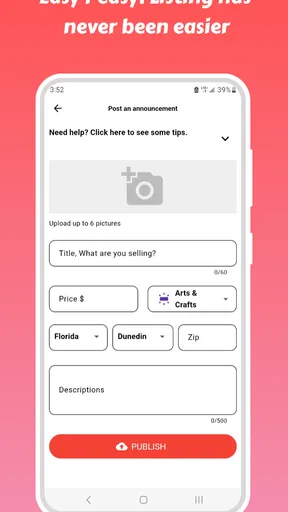
Once you’re all set up, you can start listing your items. The app guides you through the process with prompts for adding photos, descriptions, and pricing. One thing that stands out is the ease of adding multiple images. You know what they say, a picture is worth a thousand words, and having a gallery of images can really help sell your items.
Browsing the Bazaar
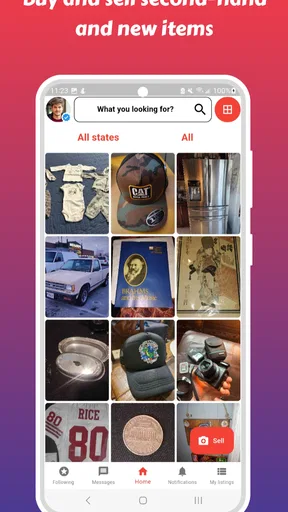
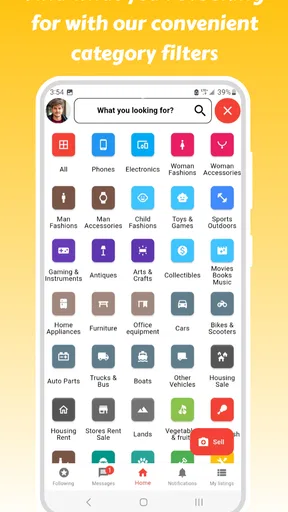
The browsing experience on FleaMarketBay is akin to wandering through a vibrant flea market, but without the crowds and with a coffee in hand from the comfort of your couch. You can filter your searches by category, location, and price, making it a cinch to find exactly what you’re looking for.
The app features a variety of categories from electronics to vintage collectibles. I found myself scrolling through the antiques section, discovering quirky finds that sparked a bit of nostalgia. The app also suggests items based on your previous searches, which I found quite handy.
Buying and Selling Made Easy
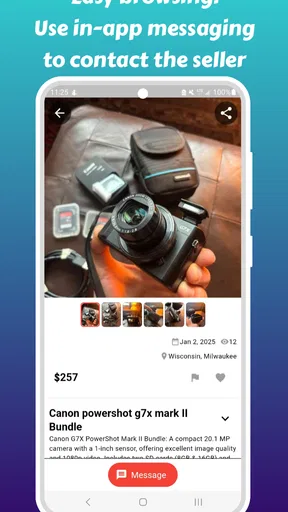
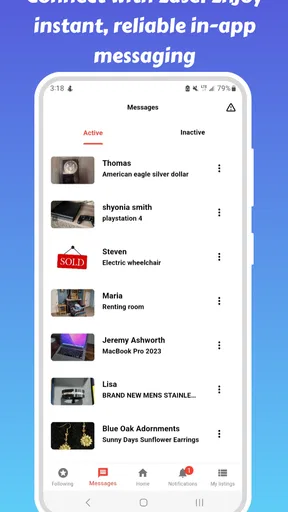
One of the standout features is the chat functionality. Once you’ve found something you’re interested in, you can directly message the seller to negotiate terms or ask questions. This feature streamlines communications and keeps everything within the app, which is super convenient.
For sellers, it’s all about the ease of transaction. You can set your preferred payment methods, and the app supports various options like PayPal and direct bank transfers. Shipping details are also easily managed within the app, which means less back-and-forth and more focus on getting your items to their new homes.
The Community Vibe
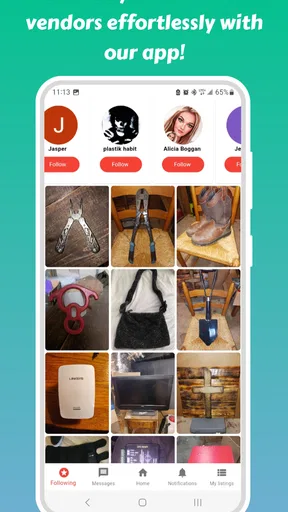
What I genuinely appreciate about FleaMarketBay is the community feel. The app encourages users to rate and review transactions, which builds trust among users. You can see a seller’s rating before making a purchase, giving you peace of mind.
There’s also a section for community tips and tricks, where users share their buying and selling experiences. It’s a nice touch that fosters a sense of belonging and helps newbies get the most out of the app.
Final Thoughts
So, is FleaMarketBay worth a download? Absolutely! Whether you’re a seasoned seller or a curious shopper, this app offers a seamless experience that takes the headache out of buying and selling. It’s a fantastic tool for decluttering your home or diving into the world of second-hand treasures.
Give it a whirl and see what gems you can find or sell. With its user-friendly interface and vibrant community, FleaMarketBay is a keeper in my book!
Verdict
Strengths of FleaMarketBay: Marketplace
- User-friendly interface simplifies navigation.
- Wide range of categories for diverse items.
- Secure payment options enhance trust.
- Integrated chat for easy buyer-seller communication.
- Quick listing process saves time.
Limitations of FleaMarketBay: Marketplace
- Limited customer support options.
- Occasional app crashes reported.
- Some listings lack detailed descriptions.
- Shipping options can be limited.
- In-app advertisements can be intrusive.
Similar Picks in This Category
View All
SHEIN-Shopping Online
Roadget Business PTE. LTD.4.8

Amazon Shopping
Amazon Mobile LLC4.4


Mercado Libre: Compras online
Mercado Libre4.8

Wish: Shop and Save
Wish US Holdings LLC4.7

Alibaba.com - B2B marketplace
Alibaba Mobile4.4
Frequently Asked Questions
What is FleaMarketBay and how does it work?
FleaMarketBay is a user-friendly marketplace app designed for buying and selling a wide range of products. Users can browse listings, communicate with sellers, and make purchases directly through the app. It features categories for electronics, clothing, furniture, and more, making it easy to find what you need or sell items you no longer use.
Is FleaMarketBay safe to use for transactions?
Yes, FleaMarketBay implements several safety features to protect users during transactions. It offers secure payment options and allows users to rate and review each other, promoting a trustworthy community. However, as with any online marketplace, it's important to exercise caution and follow safety tips for online buying and selling.
Are there any fees associated with using FleaMarketBay?
FleaMarketBay is free to download and browse. Listing items for sale is also free, but the app may charge a small fee for certain premium features, such as boosting your listing for greater visibility. It’s advisable to review the app's pricing section for detailed information on any potential fees.
Can I use FleaMarketBay internationally?
FleaMarketBay is primarily designed for local buying and selling, but it does support international transactions depending on user preferences and item availability. Users should check the app's settings to ensure their location and shipping preferences are correctly configured to support international use.
How can I contact customer support if I encounter issues?
FleaMarketBay offers a dedicated customer support team accessible through the app. Users can reach out via the help section, which provides FAQs, email support, and sometimes live chat options depending on your region. The team is responsive and aims to resolve issues promptly to ensure a smooth user experience.
